
Restaurant inventory management: how to do it, step by step
Restaurant inventory management means knowing, at any moment, how much of each ingredient you have, where it is and when it expires. It combines four routines: counting what you have, setting a par level for each item, using first what expires first, and recording what goes out, including waste. Without it, food cost is a guess.
Why inventory decides a restaurant’s margin
-
Food cost that adds up
Cost of goods sold is only real when opening and closing stock are actually counted. Estimated stock means estimated food cost, and margin disappears without anyone knowing where.
-
Less waste
A perishable forgotten at the back of the walk-in is money that was bought, received and stored only to end up in the bin. Whoever knows what expires today uses it first.
-
No 86’d items mid-service
Running out of an ingredient mid-service costs dishes off the menu, pricier emergency purchases and guests who don’t come back.
Inventory methods that work in a kitchen
No single method does the job. Restaurants that keep inventory under control combine the five below, each answering a different question.
-
Periodic physical counts
Count what is actually there, always on the same day and at the same time, before service. Perishables every week; dry goods and drinks every two weeks or monthly. The count is what corrects everything else.
-
Par levels and reorder points
For each item, the lowest level that lasts until the next delivery with a margin. Example: if you use 6 kg of cheese a day, delivery takes 2 days and you want 1 day of safety stock, the par is 18 kg. Below that, you order.
-
FIFO and FEFO
The order of use: first in, first out (FIFO), and first expired, first out (FEFO). It is what stops the older batch from expiring behind the newer one.
-
ABC analysis
A few items make up most of the cost (meat, fish, cheese, drinks). They are your A items: counted more often, tighter par levels and controlled access. C items can be counted less strictly.
-
Usage and waste log
Record what goes out, and above all what goes out without becoming a sale: expired, spoiled, prep mistakes. Without that number, the gap between counted and expected stock has no explanation.
How inventory feeds your food cost
Cost of goods sold (COGS) for a period comes from three numbers, and two of them are counted stock.
COGS = opening inventory + purchases − closing inventory
Example: opening inventory of $12,000, purchases of $30,000 and closing inventory of $10,000 give a COGS of $32,000. With $100,000 in sales, food cost is 32%. A closing count done "by eye" and overstated by $2,000 would show 30% on paper, and the margin that seems to be there isn’t.
How to set up restaurant inventory control
-
Organize before you count
One area per type (walk-in, freezer, dry store, drinks) and a fixed spot for each item. A messy shelf gives a wrong count.
-
Standardize each item’s unit
Kilo, litre, unit, portion: one per item, the same for purchasing, counting and recipes.
-
Set par levels for the items that matter most
Start with your A items. Base it on daily usage, delivery lead time and a safety margin.
-
Label everything opened or prepped
Anything portioned, prepped or thawed needs a label with product, date and use-by date. An unlabelled ingredient is in nobody’s numbers.
-
Count on the same day and time
Before service, with the same person or pair. Compare with expected stock and investigate the gap while it is still small.
-
Log waste and close your COGS
Expired, spoiled and prep mistakes get their own log. With counted stock and recorded waste, the month’s food cost closes on real numbers.
Spreadsheet or app: what changes day to day
A spreadsheet works as long as someone keeps it up. The catch is that every movement has to be typed in by hand, and the kitchen doesn’t stop for that.
| Task | Spreadsheet | EtiquetaChef |
|---|---|---|
| Stock level per ingredient | Whatever was last typed in | Calculated from active labels, every time a label is printed or cleared |
| Use-by date of each portion | Written in pen on the lid | Calculated from the house rule and printed on the label |
| Par level alert | Only if someone checks | Alert on the owner’s and manager’s phone when stock drops below par |
| Physical count | Paper and clipboard, then typing | The system balance is already on screen to compare with the shelf |
| Waste and discards | Rarely recorded | Each discard recorded when the label is cleared, with quantity, time and person |
| Purchase invoices | Typed by hand | No invoice entry: stock is created by the label, when the ingredient is prepped or stored |
The mistakes that distort inventory most
- Counting on a different day and time each week: the number moves with the calendar, not with usage.
- Mixing units (case when buying, kilo when counting, gram in the recipe).
- Not recording what went in the bin: waste shows up as "missing".
- The same par level for every item instead of one based on each item’s usage.
- Storing opened ingredients without a label: nobody knows if it is still good, so it gets thrown out.
- Keeping inventory control in one person’s head.
How EtiquetaChef tracks inventory through labels
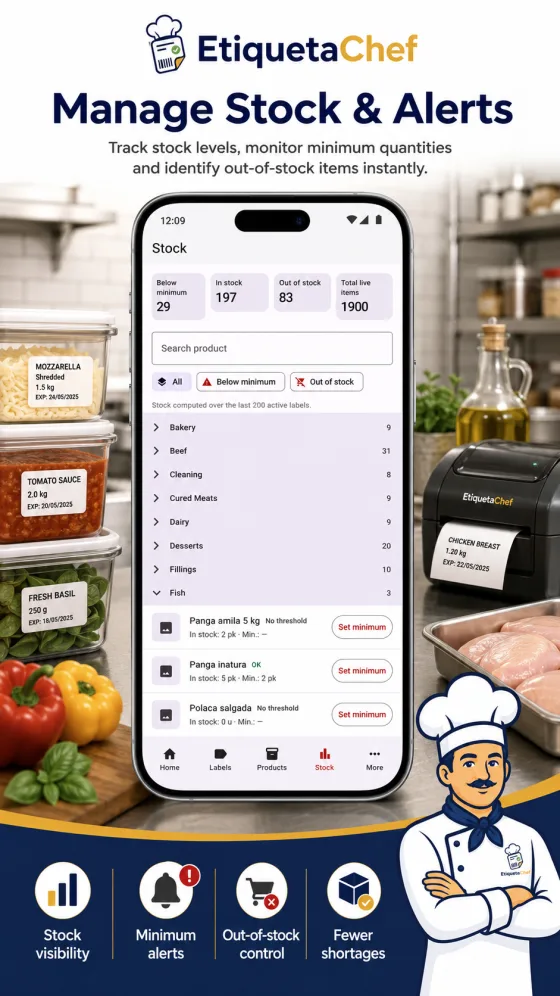
In EtiquetaChef, stock isn’t typed in: it is the sum of active labels. Every prepped, opened or portioned ingredient gets a label with its quantity, and every use or discard clears it. Stock stays right because it follows what the team already does in the kitchen.
- Stock per product, live The Stock screen shows how much of each product is on active labels, in the product’s unit, on phone and computer.
- Par levels with alerts You set each product’s minimum, and the app alerts the owner and manager when stock drops below it or hits zero, before it runs out mid-service.
- Usage and discard clearing When an item is used or thrown out, the team clears the label as used or discarded, with quantity and person. Anything about to expire shows up on the day’s list before it does.
- List of what expires today The owner and the manager see on the home screen what expires today, tomorrow and what has already expired, and the team filters the day’s labels. What is close to the limit gets used before it turns into waste.
- Works offline The label prints and the clearing is recorded even when the kitchen Wi-Fi is down. Everything syncs to the system when the connection is back, and the balance settles on its own.
Read next
Restaurant inventory management: frequently asked questions
How do you manage inventory in a restaurant?
Organize storage by area, standardize each item’s unit, set par levels for the items that weigh most, label everything opened or prepped, count on the same day and time, and log waste. Then the month’s food cost closes on real numbers.
How often should a restaurant count inventory?
Perishables weekly; dry goods and drinks every two weeks or monthly. High-cost (A) items deserve more frequent counts. What matters most is counting on the same day and at the same time.
How do you calculate a par level?
Multiply daily usage by the supplier’s delivery lead time and add a safety margin. If you use 6 kg a day, delivery takes 2 days and the margin is 1 day, the par is 18 kg.
What is the formula for cost of goods sold?
COGS = opening inventory + purchases − closing inventory. Divided by sales, it gives your food cost percentage. That is why stock must be counted: it enters the formula twice.
Is a spreadsheet enough for restaurant inventory?
It works while someone keeps it updated by hand. The weak point is that every movement must be typed, and whatever isn’t typed disappears from the numbers. An app that calculates stock from labels takes that typing out of the routine.
Does EtiquetaChef record purchase invoices?
No. In EtiquetaChef stock is created by the label: when an ingredient is prepped, opened or portioned, the label records the quantity, and every use or discard clears it. Stock follows what the kitchen does, with no invoice entry.
Ready to stop wasting product?
Talk to a consultant and put together the right plan for your kitchen.
Talk to a consultant